Home health agency automation is the practice of mapping an agency’s real workflows — intake, scheduling, documentation, billing — then automating the parts that are safe and deterministic first. Most agencies fail because they buy a tool before anyone maps the work it’s meant to do.
MIT’s Project NANDA studied enterprise generative AI in 2025 and found that 95% of pilots produced no measurable profit. Home health is not exempt. If anything, it’s a harder case — you’re automating around clinical documentation, payer rules, and caregiver schedules that change hourly, all under HIPAA. Home health agency automation fails for the same reason most enterprise AI fails: the agency bought a tool before anyone mapped the work the tool was supposed to do.
I’ve watched this happen up close. An agency signs up for an AI scheduling assistant or a “smart” documentation add-on because it demoed well, then discovers six months later that intake still takes the same three phone calls, the scheduler still rebuilds the week by hand every Monday, and the compliance binder still gets assembled the night before survey. The technology worked. The fit didn’t. Nobody checked whether the process the software assumed matched the process the agency actually runs.
This is a piece about doing it in the right order — the diagnostic before the surgery.
What is home health agency automation?
Home health agency automation is the use of software and AI to run high-frequency agency workflows — caregiver scheduling, intake and eligibility, clinical documentation, compliance, and billing. It works only when the agency maps and scores each process before choosing tools, so automation lands where it recovers real money instead of where it merely demos well.
What home health agency automation actually means
When operators say they want to automate, they rarely mean one thing. In a multi-location home health agency, “automation” is shorthand for a dozen distinct workflows, each with its own owners, systems, and failure modes:
- Caregiver scheduling — matching availability, credentials, geography, and client preference, then reworking the whole board when someone calls out at 6 AM.
- Intake and eligibility — collecting referrals, verifying insurance, confirming authorizations before care starts.
- Clinical documentation — visit notes, care plans, and the endless reconciliation between what happened in the home and what the EMR requires.
- Compliance and survey prep — chart audits, missing-signature chases, and assembling evidence that care met the plan.
- Billing and claims — turning documented visits into clean claims that don’t bounce.
Caregiver scheduling automation is the one everybody asks for first, because it’s the most visibly painful. But it’s also the one most tangled up in the others — you can’t automate the schedule without knowing how authorizations gate visits and how documentation closes them. Treat these as one undifferentiated “AI project” and you get a tool that automates the easy 20% and leaves the coordination — the part that actually costs you overtime and denials — exactly where it was.
Why home health agency automation projects fail
The failure pattern is consistent enough that you can predict it. Researchers who studied the 95% attribute the gap to poor workflow design, not weak AI models. In home care specifically, three things go wrong:
The agency automates the demo, not the operation. Vendors sell to the visible symptom — usually scheduling — with a workflow that assumes your data is clean and your process is standard. It isn’t. Every agency has local rules, informal exceptions, and a scheduler who holds half the logic in her head. Software that ignores that logic doesn’t remove the work; it moves it.
Nobody scored the ROI before building. “It seems cool” is not a business case. Automating a task that happens twice a month saves nothing. The processes worth automating are the high-frequency, high-rework ones — the schedule rebuild, the authorization chase, the documentation reconciliation — and until you’ve measured which those are, you’re guessing with a budget.
The automation touches clinical data with no governance. A HIPAA compliant AI workflow is not the default setting on a general-purpose tool. If an AI system reads visit notes or PHI, you need scoped access, an audit trail, and a human in the loop on anything clinical. Agencies that skip this either stall in legal review or, worse, don’t stall and create exposure they can’t see. Reliable automation on sensitive surfaces is deterministic first — rules and validated integrations — with the probabilistic AI confined to where it genuinely adds value.
The diagnostic before the surgery
Here’s the discipline the 5% share: they map the work before they automate it. AskVicky runs the diagnostic before the surgery.
Concretely, that’s what Phase 0 — Discovery is. Over two to three weeks, we run 15 to 20 structured AI-driven interviews across an agency — schedulers, intake coordinators, clinical managers, billing, the branch directors who see where it all breaks. AskVicky maps every process end to end, then scores each one on frequency, rework, error cost, and how cleanly it could be automated. What comes out is not a slide deck of AI trends. It’s a prioritized catalog: this is what your operation actually does, here’s where the money is leaking, and here — ranked — is where automation returns something.
On a recent engagement with a multi-location home health agency, the assumption walking in was that scheduling was the fire to fight first. The mapping said otherwise. The scheduler was painful but bounded. The real leak was upstream — authorizations weren’t being verified before visits, so a predictable share of care was delivered against expired or missing authorizations, then denied at billing weeks later. No scheduling tool would have touched that. The diagnostic found a documentation-and-eligibility gap that was worth more, in recovered revenue, than the automation everyone had walked in asking for.
That’s the entire argument for mapping first. The most expensive process to automate is the wrong one.
What this looks like when it’s done right
Phase 0 gives you the map and the scored catalog. Phase 1 is where the top-priority items get built — and built the way sensitive operations demand: deterministic scaffolding wherever the work can be expressed as rules and integrations, validated connections into the systems you already run (an EMR or scheduling platform like WellSky, your billing system), and human-in-the-loop gates on anything clinical or financial. WellSky integration automation, done properly, isn’t an AI guessing at your data — it’s a governed pipeline that moves verified information between systems, with the LLM used only where it earns its place.
The sequence matters more than any single tool:
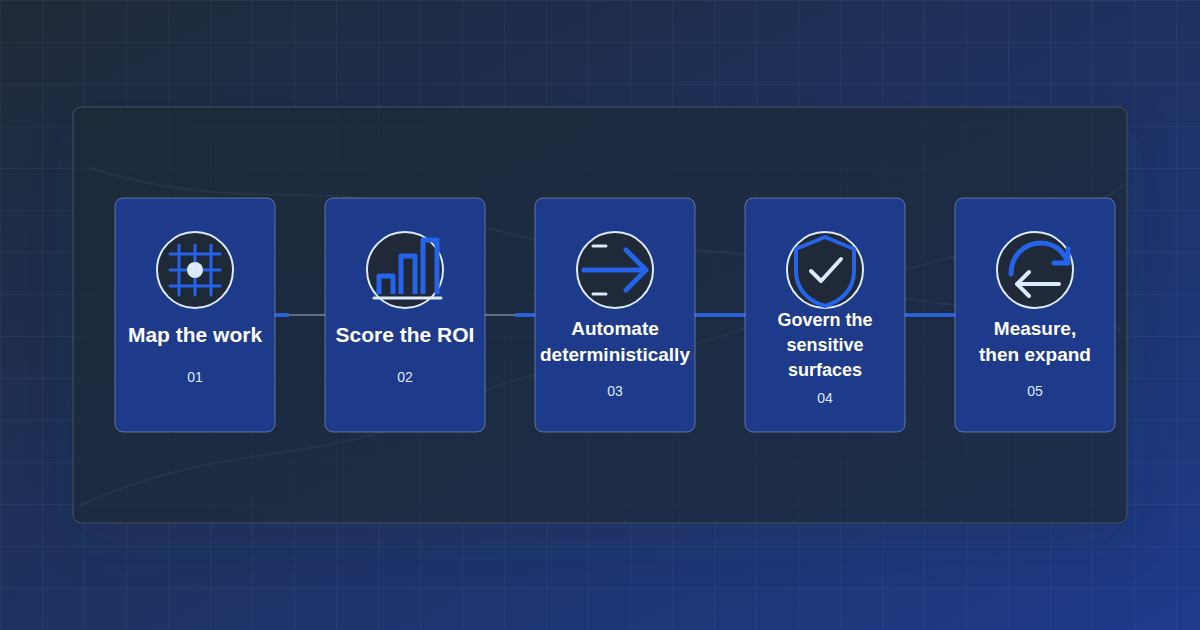
- Map the work. Every process, every owner, every exception — before you touch the technology.
- Score the ROI. Rank by frequency and rework, tie each candidate to a real dollar lever — overtime, denials, admin hours.
- Automate deterministically first. Rules, integrations, and validated data flows carry the load; the AI handles only what genuinely needs judgment.
- Govern the sensitive surfaces. Scoped access, audit trails, and a human in the loop anywhere PHI or clinical decisions are involved.
- Measure, then expand. Prove the return on the first automations before widening the footprint.
Do it in that order and home health agency automation stops being a gamble. Do it in the reverse order — tool first, hope for fit — and you join the 95%.
Where to start
If you’re a COO or operations leader at a multi-location agency and you know you need to automate but don’t know which process to touch first, that’s exactly the question the diagnostic answers. You don’t need to have your data clean or your processes documented — mapping that is the work.
See how we structure the engagement on our How We Engage page, read a sample of what the diagnostic produces in our Operations Intelligence Report, and review how we handle clinical and client data on our Security page. If you want the background on the team doing the work, that’s on our About page.
When you’re ready to find out which of your processes is actually worth automating first, book a 15-min call.